Home
Shop
Panpower UPS – Reliable Power Backup for Homes and Businesses in Lebanon

Panpower UPS in Lebanon: How to Choose the Right Model and Size

Power cuts don’t just mean sitting in the dark. They crash your computer mid-task, corrupt files, damage sensitive electronics, and shut down a POS terminal in the middle of a sale. A UPS is the piece of hardware that stands between a normal outage and a genuinely bad day for your business or home office. This guide covers what a UPS actually does, how Panpower’s range breaks down, and — the part most guides skip — how to actually size one correctly for your own setup.

Panpower Online UPS front display panel showing load and battery status

What a UPS Actually Does

A UPS (Uninterruptible Power Supply) sits between your electrical outlet and your devices. When the main power cuts out, it switches to its internal battery in milliseconds — fast enough that your computer, POS terminal, or router doesn’t register the interruption at all. That’s the key difference from a generator, which takes several seconds to kick in and won’t save you from that gap. A UPS isn’t there to run your equipment through a long outage; it’s there to bridge the gap safely, or give you enough time to save your work and shut down properly.

Line-Interactive vs Online Double-Conversion: What’s the Difference?

Panpower sells both types, and picking the wrong one for your situation is the most common mistake buyers make.

  • Line-interactive (the MT1800, MT2000, MT3000 series) monitors incoming power and switches to battery when it detects an outage or a significant voltage swing. These models also include AVR (Automatic Voltage Regulation), which corrects minor voltage sags or surges on the spot without switching to battery at all — useful given how much Lebanon’s grid voltage fluctuates even outside full outages. The battery switch itself happens in under a millisecond, fast enough for virtually all home and small-office equipment.
  • Online double-conversion (Panpower’s Online Series, 1000VA–10,000VA) never actually switches — your equipment runs off the battery-fed inverter continuously, with incoming power constantly recharging it. There’s zero transfer time because there’s nothing to transfer.
Panpower Online UPS rear panel with output sockets and connectors

Panpower Models Compared

Model Capacity Topology Batteries Best For
MT1800 1800VA / 720W Line-interactive + AVR, pure sine wave Dual 12V 9Ah Home office, single workstation
MT2000 2000VA / 1200W Line-interactive + AVR Dual 12V 9Ah POS counter, heavier single setup
MT3000 3000VA Line-interactive + AVR Larger single setups, light multi-device
Online Series 1000–10,000VA Online double-conversion, pure sine wave Server rooms, multi-terminal POS

If you’re protecting a single computer or router, line-interactive is enough and costs less. If you’re protecting a server, a small network rack, or several POS stations at once, the Online Series is worth the extra cost.

How to Size a UPS: VA, Watts, and Runtime

A UPS is rated in both VA (volt-amps) and Watts — the Watts figure is what actually matters for sizing. Add up the wattage of everything you’re protecting, leave comfortable headroom above that total, and match it to a model. For the full step-by-step process with worked examples, see our dedicated guide: How to Size a UPS for Your Home or Office.

Panpower Online UPS internal battery module

The MT1800, and Panpower’s Online Series, are both confirmed pure sine wave output — the same clean power quality as the grid itself. This matters because cheaper UPS units often output a stepped or simulated waveform instead, which can cause some power supplies and electronics to run hotter or degrade faster over time. If pure sine wave output is a requirement for your equipment, confirm the exact waveform spec for whichever specific model you’re considering, since it can vary by model within a manufacturer’s range.

Battery Life and Maintenance

UPS batteries are consumable parts, not permanent ones — like a car battery, they lose capacity gradually with age and with every discharge cycle. A unit that no longer holds a useful charge during an outage almost always means it’s the battery, not the whole UPS, that needs attention. For warning signs, maintenance tips, and replacement guidance, see our full UPS battery maintenance guide. Because CompuOne stocks Panpower directly, replacement batteries and service are available locally.

Who Actually Needs One

  • Home offices and remote workers who can’t afford a crashed laptop or a corrupted file mid-task.
  • Retail shops and restaurants running a POS system that needs to stay online through a sale.
  • Small offices and server rooms running networking equipment that can’t tolerate a reboot every outage, and security camera systems that need to keep recording through an outage.
  • Anyone tired of replacing electronics damaged by dirty power or sudden shutdowns.

Frequently Asked Questions

How long will a Panpower UPS run my computer during an outage?
It depends on how much of the unit’s rated capacity you’re using. CompuOne’s team can give you a realistic estimate based on your actual equipment — or see our sizing guide for a worked example.

Can I plug a printer or router into the same UPS as my computer?
Yes, as long as the combined wattage stays comfortably under the UPS’s rated capacity.

What’s the difference between VA and Watts on a UPS label?
VA (volt-amps) is the apparent power rating; Watts is the real power your equipment actually draws, and it’s the number that matters for sizing.

What does AVR do on a line-interactive UPS?
AVR (Automatic Voltage Regulation) corrects minor voltage sags or surges instantly, without switching to battery power — reserving the battery for actual outages.

Do I need an online UPS for a single home computer?
No. Line-interactive models like the MT1800 or MT2000 are sufficient for a single workstation. Online double-conversion units are built for server rooms and multi-device commercial setups.

Buying and Support Through CompuOne

Every Panpower unit sold through CompuOne comes with local warranty backing, and the team can help size the right UPS to your actual load. Browse the full UPS Lebanon range to find the right Panpower model for your setup.

Best receipt thermal printer for businesses in Lebanon – buying and installation guide

The Best Receipt Thermal Printer in Lebanon: A Complete Buying & Installation Guide

If you run a shop, restaurant, pharmacy, or any business that issues invoices, a receipt thermal printer is one of the most important pieces of equipment on your counter. It’s fast, it’s cheap to run, and unlike ink or toner printers, it never runs out of cartridges. In this guide, we’ll walk through what a thermal receipt printer is, the best models available in Lebanon right now, how to install one, who actually needs one, and why after-sales support matters just as much as the printer itself.

What Is a Thermal Receipt Printer?

A thermal receipt printer uses heat instead of ink to print on special heat-sensitive paper. A small print head heats up in the exact pattern of the text or barcode, and the paper darkens instantly. That’s why receipt printing is nearly silent and lightning fast compared to old dot-matrix printers.

Because there’s no ink, no toner, and far fewer moving parts, thermal printers are more reliable for high-volume daily use — think supermarkets, restaurants, and pharmacies printing hundreds of receipts a day.

Best Receipt Printer Models in Lebanon

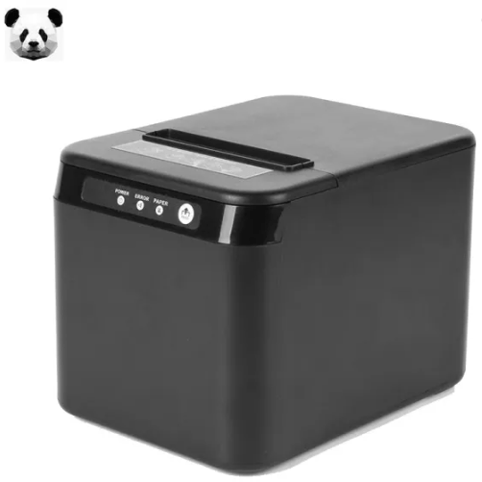
Compuone carries a wide range of receipt and label printers, with Panda as the standout brand for value and reliability. Two models worth highlighting from their receipt printer lineup:

  • PANDA Receipt Printer 307 U+L – A compact, no-nonsense USB + LAN thermal printer. It’s a great fit for small to mid-sized shops that want a wired network connection without paying for extra features they don’t need.
  • PANDA Receipt Printer 800 U+L – A step up in build and speed, also with USB + LAN connectivity, and a favorite among retail customers for handling higher daily transaction volumes without slowing down.

Both models cover the two connection types most POS setups actually use in Lebanon — USB for direct connection and LAN for networked tills — making them an easy, low-risk choice whether you’re setting up your first counter or replacing an aging printer.

PANDA Receipt Printer

Panda vs. Epson vs. Bixolon: How Does It Compare?

Epson and Bixolon are well-known names in receipt printing, and both make solid hardware. So how does Panda stack up?

  • Price. This is where Panda has the clearest edge. Models like the PAN307 U+L and PAN800 U+L are priced well below comparable Epson TM-series or Bixolon SRP-series printers, while still covering the same core USB/LAN connectivity that most businesses need. For a shop buying multiple printers across several counters, that price gap adds up quickly.
  • Quality and durability. Epson and Bixolon are often seen as the premium, industrial-grade choice — and for very high-volume enterprise environments, they can have an edge in long-term duty cycles. But for the everyday needs of retail shops, restaurants, and pharmacies, Panda’s build quality holds up well in daily use, and most owners don’t notice a meaningful gap in print speed or reliability.
  • Availability and support. Because Epson and Bixolon are imported premium brands, spare parts and support in Lebanon can take longer to source. Panda printers, on the other hand, are widely stocked locally, so replacement parts, ribbons, and paper rolls are always close at hand.
  • Overall value. For most small and mid-sized businesses, Panda offers the better balance: you get dependable everyday performance and easy local support at a noticeably lower cost than Epson or Bixolon. Larger enterprises with very high print volumes may still lean toward the premium brands, but for the vast majority of shops and restaurants in Lebanon, Panda is the more practical buy.

Label Printers: Not Just Receipts

Many businesses that need receipt printers also need to print barcode or shipping labels — for inventory, pricing tags, or logistics. Panda covers this too, with label printer models that pair naturally with the 307 U+L and 800 U+L on the same counter:

  • PANDA Label Printer PAN310 – A compact barcode label printer, well suited for pricing tags and small product labels in retail.
  • PANDA Label Printer PAN350 – A step up in resolution and print width, good for stores that print a higher volume of labels daily.
  • PANDA Label Printer H500E – A wider-format label printer (108mm) with USB/Ethernet connectivity, built for shipping labels and heavier logistics use.

Running a PAN307 U+L or PAN800 U+L for receipts alongside one of these label printers

gives a shop everything it needs at checkout and in the stockroom, without mixing brands or drivers. If you also need barcode scanning hardware to go with your label printer, Compuone’s barcode reader lineup covers that too.

Why Panda Is One of the Best Printer Brands in Lebanon and Abroad

Panda has built a strong reputation both locally and internationally as a dependable, cost-effective choice for point-of-sale hardware. A few reasons it stands out:

  • Built for everyday retail use. Panda printers are designed to handle the daily grind of retail and hospitality environments without breaking down.
  • Flexible connectivity. Whether your setup needs USB or LAN, there’s a Panda model to match — no need to change your existing POS software or network.
  • Consistent print quality. Sharp, legible text and barcodes, which matters for receipts, invoices, and inventory labels alike.
  • Wide availability of accessories. Stands, adapters, and paper rolls are easy to find, keeping your printer running without long downtime.
Thermal Label Printer

How to Install a Receipt Thermal Printer

Setting one up is simpler than most people expect. Here’s the general process:

  1. Unbox and connect power. Plug in the power adapter and connect the printer to your computer or POS terminal via USB, LAN, or Wi-Fi, depending on your model.
  2. Load the thermal paper roll. Open the paper compartment, drop in the roll (make sure it’s facing the correct way — the heat-sensitive side down), and close the cover until it clicks.
  3. Install the driver. Most Panda printers come with a driver CD or a download link; install it on your POS computer so the system recognizes the printer.
  4. Connect to your POS software. Whether you’re using Retail Hub, a custom POS system, or accounting software, select the printer from the list of installed devices and set it as your default receipt printer.
  5. Run a test print. Print a sample receipt to confirm alignment, cutting, and print quality are all working correctly.
  6. For wireless models, connect the printer to your Wi-Fi network through its configuration menu or companion app before pairing it with your POS system

If any of these steps feel technical, Compuone’s technical team can walk you through setup remotely or on-site.

Who Needs a Receipt Printer?

Thermal receipt printers aren’t just for supermarkets. They’re used by:

  • Retail shops and boutiques – for quick, professional checkout receipts.
  • Restaurants and cafés – for order slips and customer bills.
  • Pharmacies – for fast, accurate transaction records.
  • Warehouses and logistics teams – using label printers for barcode tracking and shipping.
  • Any small business owner switching from handwritten receipts to a more professional, POS-integrated system like a full POS system.

Warranty, After-Sales Support, and Why Compuone Is the Right Choice

A printer is only as good as the support behind it. This is where Compuone stands out as one of the leading suppliers of POS equipment in Lebanon. Every receipt printer sold comes with manufacturer warranty coverage, and Compuone’s team handles:

  • Warranty claims and repairs, so you’re not left guessing if something goes wrong.
  • Driver and software support, including access to a dedicated drivers page and manuals.
  • Technical troubleshooting, whether it’s a paper jam, connectivity issue, or POS integration question.
  • Spare parts and accessories, like power adapters and printer stands, so you’re never stuck waiting weeks for a replacement part.
  • Direct customer support via phone and WhatsApp, meaning real help from a real person when you need it.

For businesses in Lebanon, having a local, responsive support team matters — you don’t want to be stuck dealing with an overseas supplier when your printer goes down in the middle of a busy shift. Compuone’s combination of quality Panda hardware, competitive pricing, and dependable after-sales support is what makes it a trusted name for POS equipment across the country.

Final Thoughts

Choosing the right receipt printer comes down to your business type and connectivity needs — USB, LAN, Wi-Fi, or mobile. Panda’s lineup covers all of these options with reliable, well-reviewed models, and Compuone backs every purchase with proper warranty and support. Browse the full range of receipt printers at Compuone to find the right fit for your business.

Biometric attendance Machine

Best Fingerprint & Time Attendance Machines in Lebanon: ESEYE, ZK, and Digital Persona Compared

Tracking employee hours accurately is one of those things that seems simple until you’re doing it with paper sign-in sheets or manual spreadsheets. A biometric time attendance machine solves that instantly — no buddy-punching, no disputes over hours, and clean data that feeds straight into payroll. In this guide, we’ll look at the best time attendance and fingerprint access options in Lebanon, compare ESEYE to ZK and other well-known brands, and cover a fingerprint device that’s changing how POS checkouts work for busy stores and restaurants.

What Is a Time Attendance Machine?

A time attendance machine uses fingerprint recognition, face recognition, or an RFID card to log when an employee clocks in and out. The device timestamps every entry and stores it, either on the machine itself or synced to attendance/HR software, so payroll and scheduling are based on real, tamper-proof data instead of handwritten logs.

Best Time Attendance Models in Lebanon

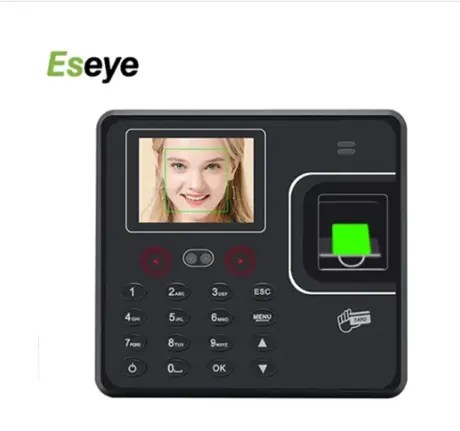
Compuone’s time attendance lineup includes two standout ESEYE models:

  • ESEYE 2815T Time Attendance Fingerprint – A fingerprint-based clock-in device with a 2.4” color screen, RFID card reader, and multi-language support. Straightforward, reliable, and priced for small to mid-sized teams.
  • ESEYE F1C2T Time Attendance – Face Recognition – Adds face recognition on top of fingerprint and RFID card options, giving staff a fast, contactless way to clock in — useful for larger teams or environments where touchless check-in matters.

ESEYE vs. ZK and Other Well-Known Brands

ZKTeco is probably the name most people think of first when it comes to biometric attendance devices, and it’s earned that reputation — ZK machines are widely used and generally reliable. So why does Compuone lean toward ESEYE?

  • Connectivity. This is where ESEYE pulls ahead. ESEYE devices support USB, TCP/IP, and Wi-Fi connectivity in the same unit, so you can connect however suits your office —

direct USB for a single till, LAN for a networked office, or Wi-Fi if running cables isn’t practical. ZK and several other brands often limit you to fewer connection options per model, meaning you may need to buy a specific variant just to get the connectivity you want.

Eseye biometric terminal device
  1. Access control built in. ESEYE devices double as access control units, meaning the same fingerprint or face-recognition hardware that logs attendance can also lock or release a door. ZK offers access control too, but usually as separate product lines — with ESEYE, you often get both in one device, which simplifies both budgeting and installation.
  2. Price-to-feature balance. For the features included — multiple connection types, access control, RFID, and biometric recognition — ESEYE tends to be more competitively priced than comparable ZK or other imported models, making it an easier decision for small and mid-sized businesses that still want enterprise-style features.
  3. Local support. Because Compuone sells, installs, and supports ESEYE directly, you’re not dealing with a grey-market import with no local warranty path — something that’s unfortunately common with lesser-known attendance brands sold online.

For businesses that want one device to handle clock-in tracking and door access without juggling multiple brands or systems, ESEYE is the more practical choice — and Compuone backs it with full local support.

Digital Persona: The Smarter Alternative to Magnetic Card Readers

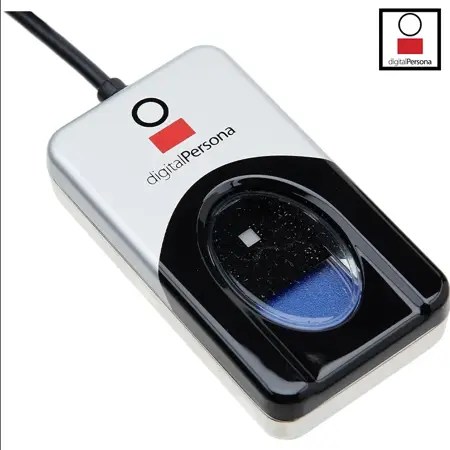
Alongside time attendance, Compuone also carries the Digital Persona 4500 USB Fingerprint Reader — and it deserves its own spotlight because it solves a different problem: identity verification at the point of sale.

Many POS systems still rely on magnetic card readers or PIN codes for cashier login, shift changes, or authorizing discounts and voids. The problem is obvious — cards get shared, lost, or forgotten, and PINs get passed around just as easily. The Digital Persona 4500 replaces all of that with a fingerprint scan:

  • Faster and more secure than a card swipe. A fingerprint can’t be lent to a coworker or left at home.
  • Ideal for big stores and restaurants. Anywhere multiple cashiers share a till across shifts, fingerprint login keeps an accurate, accountable record of exactly who processed which transaction.
  • Simple USB connection. Plugs directly into the POS terminal — no extra network setup

required.

  • Sold only by Compuone in Lebanon. This is an exclusive offering, meaning Compuone is the only source for the device locally, along with the installation and support that comes with it.

For a large retail floor or a busy restaurant with several staff members on the same POS station, this small device closes a real security gap that card readers and PIN codes leave open.

Digital Persona fingerprint reader scanner

Who Needs These Devices?

  • Offices and institutions – ESEYE 2815T or F162T for clean, disputeless attendance tracking.
  • Factories and retail chains with multiple entry points – ESEYE’s built-in access control, so the same device manages both attendance and door security.
  • Large supermarkets and restaurants – Digital Persona 4500 fingerprint login at every POS station, replacing shared cards or PINs.
  • Any business tired of manual attendance sheets or buddy-punching – either ESEYE model brings that to an end immediately.

Installation, Training, and After-Sales Support

Buying the hardware is only half the job — getting it installed correctly and integrated with your POS or HR software is what makes it actually useful day to day. This is where Compuone stands apart:

  • On-site installation. Compuone’s technicians set up the device, wire it into your network or POS system, and confirm it’s logging correctly before they leave.
  • Staff training. Cashiers and employees are walked through enrolling their fingerprint or face profile and using the device correctly from day one.
  • Warranty coverage. Every ESEYE and Digital Persona device sold by Compuone comes with manufacturer warranty backing, handled locally rather than through an overseas claims process.
  • Ongoing technical support. Whether it’s a software sync issue, a new employee enrollment, or a hardware fault, Compuone’s support team is a phone call or WhatsApp message away.

Final Thoughts

If you need attendance tracking with the flexibility to connect over USB, LAN, or Wi-Fi — and the option to double up as access control — ESEYE is the stronger, more cost-effective choice compared to ZK and other well-known brands. And if your POS still relies on shared cards or PINs, the Digital Persona 4500 fingerprint reader, sold exclusively through Compuone, is the more secure upgrade for busy stores and restaurants. Browse the full range on the time attendance system category and Compuone’s team will help you pick, install, and support the right setup for your business.

Professional-Grade Laptop

Best Business Laptops in Lebanon 2026: A Complete Buying Guide for Professionals and Companies

Choosing the right business laptop is no longer just about processing power. For companies in Lebanon, reliability, security, battery life, and long-term durability are equally important. Whether you’re managing a growing business, working remotely, or equipping an entire office, investing in a professional-grade laptop can significantly improve productivity and reduce downtime.

Unlike consumer laptops, business laptops are designed to withstand demanding workloads, frequent travel, and years of daily use. They offer enhanced security features, stronger build quality, better keyboards, and enterprise-level support that many organizations depend on.

Why Business Laptops Are Worth the Investment

Business laptops typically provide higher reliability, longer lifespan, advanced security features, stronger chassis construction, easier maintenance, and superior technical support. For companies operating in Lebanon, these advantages often outweigh the initial cost difference.

Lenovo ThinkPad: The Gold Standard for Business

Lenovo Think Pad Laptop

For decades, Lenovo ThinkPad laptops have been trusted by corporations, government institutions, and professionals worldwide. ThinkPads are known for exceptional keyboard comfort,

military-grade durability, advanced security options, reliable performance, and excellent battery life.

Dell Latitude: Performance and Enterprise Reliability

Dell Latitude laptops are designed specifically for corporate environments. They combine strong performance with enterprise-grade security, long product support cycles, excellent docking capabilities, and dependable thermal management.

HP EliteBook: Premium Mobility for Professionals

HP EliteBook laptops focus on portability while maintaining professional performance. They are particularly popular among executives, consultants, and professionals who travel frequently.

Features to Look for in a Business Laptop in 2026

  • Intel Core Ultra or AMD Ryzen processors
  • 16GB RAM minimum for professional multitasking
  • NVMe SSD storage with at least 512GB capacity
  • Full HD or higher-resolution display
  • Fingerprint readers and TPM security chips
  • Wi■Fi 6 or Wi■Fi 7 connectivity

Which Business Laptop Is Best for Your Needs? Small Business Owners: ThinkPad E Series Corporate Employees: Dell Latitude

Executives: HP EliteBook

Remote Workers: ThinkPad X Series Power Users: ThinkPad T Series

Office Administration: ThinkPad E or Latitude 3000 Series

Final Thoughts

The best business laptop is the one that delivers reliability, security, and productivity for years to come. For businesses and professionals in Lebanon, Lenovo ThinkPad, Dell Latitude, and HP EliteBook remain among the strongest choices available in 2026. By selecting the right device from the start, companies can reduce maintenance costs, improve employee efficiency, and support future growth with confidence.

Frequently Asked Questions

What is the best business laptop brand in 2026?

Lenovo ThinkPad, Dell Latitude, and HP EliteBook are widely considered the leading business laptop families.

How much RAM should a business laptop have?

16GB is recommended for most professional users, while 32GB is ideal for advanced multitasking.

Are business laptops more durable than consumer laptops?

Yes. Business laptops are specifically designed for intensive daily use and generally offer better durability and reliability.

How long should a business laptop last?

A quality business laptop can remain productive for 4–6 years or more when properly maintained.

Worker at POS counter

Everything You Need to Buy for Your Office in Lebanon – One Complete Guide

Opening or updating an office in Lebanon means dealing with realities most global buying guides don’t account for — dust, power cuts, and hardware that needs to survive daily heavy use, not just look good in a showroom. This guide covers the core equipment categories that actually matter, with links to detailed, verified buying guides for each.

Point of Sale: The Transactional Hub

Relying on handwritten receipts or a standalone card terminal creates real reporting blind spots — it becomes hard to reconcile accurate end-of-day sales figures. A proper POS system combines barcode scanning, a touchscreen terminal, and receipt printing into one connected setup, tracking stock and sales together rather than separately. For the actual printer hardware behind this, see our receipt printer buying guide, which covers real PANDA models with verified specs.

Printing: Matching the Printer to Your Actual Volume

A basic home-use printer struggles under genuine office volume — frequent ink shortages and slow queues are common complaints once a small office scales up. Laser printers generally offer a lower cost-per-page than inkjet for high-volume, mostly-text printing like invoices and contracts, while inkjet still makes sense for color-heavy design work. See our guide on genuine vs compatible ink cartridges for keeping ongoing printing costs under control regardless of which printer type you choose.

Professional using printer at work

Networking: Solving Lebanon’s Concrete-Wall Problem

Reinforced concrete construction, common in Lebanese offices, blocks WiFi signal significantly more than typical drywall — a single router often can’t cover a multi-room space reliably. A mesh WiFi system solves this using multiple nodes working together; see our verified router and mesh buying guide for real CUDY and TP-LINK specs.

Power Protection: Non-Negotiable for This Market

Connecting your POS terminals, network gear, and computers to a properly sized UPS protects against both data loss and hardware damage during power cuts — this matters more here than in most markets given how frequently the grid switches. See our UPS sizing guide for calculating exactly what capacity your specific setup needs, rather than guessing.

Staff Tracking

If you’re managing multiple staff, a dedicated time attendance system replaces manual sign-in sheets with tamper-proof digital records. See our time attendance comparison guide for verified ESEYE, ZK, and Digital Persona options.

Putting It Together

  • Retail or wholesale business: POS system + receipt printer + UPS are the non-negotiable core.
  • Administrative or professional office: Reliable printer + solid networking + UPS for the computers.
  • Any office with multiple staff: Add time attendance to remove manual scheduling errors.

Frequently Asked Questions

What happens to a POS sale if power cuts mid-transaction?
This depends on the specific POS software and hardware — many systems save transaction data locally as it happens. A properly sized UPS is the reliable way to keep the terminal powered long enough to complete the sale and shut down safely, rather than relying solely on the software’s own recovery behavior.

Monochrome or color laser printer for a standard office?
If your work is mostly text — invoices, contracts, shipping documents — monochrome is faster and cheaper per page. Color makes sense if you regularly print visual presentations or marketing materials in-house.

Can one cash drawer connect to multiple POS terminals?
Standard cash drawers are built to connect to a single receipt printer or terminal. For multiple checkout lanes, each terminal typically needs its own drawer to keep cash handling accountable per till.

How does biometric time attendance protect employee privacy?
These systems generally don’t store actual fingerprint images — they convert the scan into an encrypted mathematical template, which is standard practice across this category of device.

Buying Support Through CompuOne

Building out office equipment piece by piece is normal — you don’t need to buy everything at once. CompuOne’s team can help you prioritize based on what’s actually creating friction in your current setup.

Woman showing laptop screen

Best Laptops to Buy in Lebanon 2026: Lenovo ThinkPad vs IdeaPad vs HP Elite Notebook – Full Comparison

Choosing a laptop based purely on the processing chip number listed on the box is a common shortcut, but it often leads to frustration later on. A fast chip inside a flimsy chassis can overheat when room temperatures climb, and battery life or keyboard durability matter just as much day to day as raw speed. This comparison breaks down three real options in CompuOne’s range — Lenovo ThinkPad, HP EliteBook, and Lenovo IdeaPad — and which actually fits different needs.

Quick Comparison

Line Example Best For
Lenovo ThinkPad ThinkPad range Durability, repairability, business use
HP EliteBook EliteBook 840 G11 Corporate security, premium build, executives
Lenovo IdeaPad IdeaPad range Students, budget-conscious everyday use

Lenovo ThinkPad: Built for Durability

ThinkPads have a long-standing reputation for physical durability and repairability — developers and IT professionals often favor them specifically because individual components are easier to service or replace over the machine’s lifespan, rather than needing a full replacement when one part fails. Browse Lenovo ThinkPad models at CompuOne.

HP EliteBook: Corporate Security and Premium Build

Corporate executives and professionals handling sensitive documents often need a machine that combines strong security with a premium feel. The HP EliteBook 840 G11 pairs a premium aluminum build with enterprise security features built into the hardware itself. Many EliteBook models include an integrated privacy screen toggle, useful for reviewing confidential documents in shared workspaces or coffee shops without a physical privacy filter attachment.

Lenovo IdeaPad: Budget-Conscious Everyday Use

Students and freelancers often need a reliable laptop for daily multitasking without an enterprise-level price tag. Lenovo IdeaPad models balance solid everyday performance with a lighter, more portable build — practical for carrying between classes or a coworking space.

Female student with laptop

Managing Heat and Dust

Warm climates and dust can genuinely affect laptop cooling over time. Dust accumulating in the internal cooling fins traps heat and forces fans to run harder, which can cause thermal throttling — the processor slowing itself down to avoid overheating. Blowing out the exhaust vents with compressed air every few months, and keeping the laptop raised slightly off flat, dusty surfaces so intake vents draw clean air, are simple habits that prevent this over time.

Upfront Cost vs Long-Term Value

Consumer-focused laptops often carry a lower upfront price, but lighter hinges and non-upgradable components can mean earlier replacement under heavy daily use. Business-grade machines like ThinkPad or EliteBook models typically cost more upfront but hold up longer and are often easier to service individual components on, which can make them more cost-effective over a multi-year lifespan for daily business use.

Which Laptop Fits Your Situation?

  • IT professionals, developers, anyone prioritizing repairability: Lenovo ThinkPad.
  • Corporate executives, security-sensitive work: HP EliteBook.
  • Students, freelancers, budget-conscious everyday use: Lenovo IdeaPad.

Frequently Asked Questions

Can I upgrade the RAM or storage on a budget consumer laptop later?
Many thin consumer laptops use memory soldered directly to the motherboard, which can’t be upgraded later. If you expect your workload to grow, it’s worth choosing a higher configuration upfront or confirming upgradability with CompuOne before buying.

Do business laptops handle power surges better than consumer models?
Build quality varies by specific model rather than a blanket rule across all business laptops. Connecting your charger to a surge protector or UPS is a reliable way to protect any laptop, business-grade or not, from sudden power fluctuations.

Are ThinkPad keyboards really more durable than consumer laptop keyboards?
ThinkPads have a strong general reputation for keyboard durability and spill resistance, built up over years of enterprise use, though exact specifications vary by specific model and generation — worth confirming details for the specific model you’re considering.

Why does laptop battery life drop when using a mobile hotspot?
Maintaining a wireless connection to a cellular tower draws more power than connecting to a nearby WiFi router, since the radio has to work harder over greater distance. Lowering screen brightness and closing background apps helps conserve battery when working this way.

Buying Support Through CompuOne

Browse the full laptops Lebanon range at CompuOne. If you’re not sure which line fits your actual workload and budget, the team can walk you through the tradeoffs rather than upselling features you won’t use.

WiFi router on office

Smart Office Setup in Lebanon: WiFi, Time Attendance & Money Counters

Running a business in Lebanon means dealing with operational challenges that offices elsewhere rarely face — power cuts, cash-heavy transactions, and buildings with thick concrete walls that block WiFi signals. This guide covers three pieces of hardware that solve real, everyday friction: a network that stays up, staff tracking that doesn’t rely on paper, and cash counting that doesn’t eat into your day.

Network: Solving Lebanon’s Concrete-Wall Problem

Dense concrete construction, common across Lebanese offices, blocks WiFi signals far more than typical drywall. A single router often can’t cover a multi-room office reliably. A mesh WiFi system solves this by using multiple nodes that work together to blanket the space — see our full router and mesh buying guide for verified specs on CUDY’s WiFi 6 and mesh options. Running your networking gear through a properly sized UPS keeps your connection up through short power cuts rather than dropping every time the state grid switches.

Staff Tracking: Moving Off Paper Logs

Paper attendance logs or spreadsheets invite errors and buddy-punching — signing in for a late colleague. A dedicated time attendance machine using fingerprint or face recognition converts physical check-ins into clean, tamper-proof digital records that feed straight into payroll. For a full comparison of ESEYE, ZK, and Digital Persona options with verified specs, see our time attendance buying guide.

Cash Handling: Counting Without the Manual Hours

Lebanon’s cash-heavy transaction culture means even small shops handle real volumes of banknotes daily. Counting by hand costs time and invites both calculation errors and counterfeit risk. CompuOne carries several PANDA and BELLCON money counters built for exactly this:

Model Type
PANDA 920 Currency counter
PANDA 922 Multi-currency counter
PANDA N60 Money counter
BELLCON V2510 Money counter
PANDA 137B Counterfeit detector

The PANDA 922’s multi-currency capability is particularly useful in Lebanon specifically, given how routinely businesses handle both USD and LBP in the same till. If you only need counterfeit checking rather than full counting, the PANDA 137B detector is a lighter-weight, cheaper option.

Cash counting machine

Maintenance for Lebanon’s Climate

Coastal humidity and seasonal dust are real factors for electronics here. A few habits genuinely extend hardware life:

  • Position wireless nodes up on walls or ceilings, clear of furniture, for better coverage.
  • Wipe biometric scanners weekly with a microfiber cloth to keep the sensor clean.
  • Run a cleaning card through money counters periodically to prevent dust from affecting the optical sensors.
  • Keep networking gear off the floor and in a ventilated spot to reduce dust buildup and heat.

Frequently Asked Questions

What happens to my time attendance or money counter during a power cut?
This varies by specific model — some include internal backup batteries, others don’t. Connecting critical devices to a properly sized UPS is the reliable way to keep them running through short outages regardless of the device’s own battery situation.

Can a money counter handle both USD and LBP?
The PANDA 922 is built specifically for multi-currency counting, making it the right choice if your till regularly handles both currencies rather than just one.

Do thick concrete walls really affect WiFi that much?
Yes — concrete absorbs wireless signal significantly more than drywall construction common elsewhere. A mesh system or wired backhaul between nodes is usually necessary for reliable coverage across a concrete-walled office.

Is employee biometric data stored securely?
Time attendance hardware generally doesn’t store actual fingerprint images — it converts the physical scan into an encrypted mathematical template, which is a standard security approach across this category of device.

Buying Support Through CompuOne

If you’re not sure which combination of networking, attendance, and cash-handling equipment fits your office, CompuOne’s team can walk you through it based on your actual space and transaction volume rather than guessing.

Hands typing laptop

Home Office Setup Guide: Laptop, Windows 11, Printer, Networking, and Power Protection

A reliable home office needs more than a laptop and a spot by the window — it needs hardware and software that work together without crashing halfway through a task, especially given Lebanon’s power situation. This guide walks through each piece separately: laptop, operating system, printer, networking, power protection, backup storage, and POS equipment if you run a business from home.

Laptop or Desktop: The Foundation

Your choice here depends on how you actually work. A laptop offers flexibility — useful if you move between rooms, work from a café occasionally, or share your space with family. A desktop generally offers more performance per dollar and easier long-term upgrades if you’re staying at one desk permanently. Either way, prioritize at least 8GB RAM for comfortable multitasking, and an SSD rather than a mechanical hard drive — see our SSD guide for why this matters more than almost any other single upgrade. Browse CompuOne’s laptop range to compare current models.

Windows 11 Pro: Why This Matters Now

Windows 10 reached end of support from Microsoft on October 14, 2025. Without enrolling in Microsoft’s paid Extended Security Updates program, a Windows 10 machine no longer receives security patches — a real risk for anyone handling client files or business data. Microsoft Windows 11 Pro is the current, actively supported choice, and includes BitLocker and other built-in encryption tools — if your device is lost or accessed without permission, your files stay locked and unreadable without the encryption key. It also supports connecting to corporate domains, useful if you need to reach an office server remotely. If you’re currently on Windows 10 with hardware that meets Windows 11’s requirements, upgrading is worth prioritizing.

Printer: Wireless and Matched to Your Workflow

A wireless printer changes your daily workflow — send a document to print from your phone, and it’s ready by the time you reach your desk, with Wi-Fi Direct keeping it working even if your router briefly reboots. If you design colorful presentations, an inkjet handles that well. If your daily work is mostly text — invoices, contracts, shipping notes — a monochrome laser printer is more practical: faster, sharper text, and toner that lasts far longer than ink without drying out. See our guide on genuine vs compatible ink cartridges for keeping running costs down.

Retail cashier at checkout counter

Wi-Fi and Networking: Don’t Rely on the ISP’s Basic Router

The router your ISP provides is often the weakest link in a home office setup. A dedicated router like the CUDY AX3000 — dual-band WiFi 6, rated up to 3000Mbps combined, verified against CUDY’s official specifications — handles multiple connected devices with far less congestion than a basic ISP router, especially relevant if video calls compete with other household devices on the same connection. If your apartment has dead zones or multiple floors, see our router buying guide for mesh system options.

UPS and Power Protection

A proper workspace guide can’t ignore Lebanon’s electrical situation. Sudden voltage spikes can damage computer parts and erase unsaved files in a second. Connecting your computer and router to a reliable UPS is genuinely worth doing. Runtime during an outage depends entirely on the specific UPS model, its battery capacity, and how much load you’re actually connecting — there’s no single fixed number that applies across different setups. See our UPS sizing guide for how to calculate this properly for your own equipment.

External Backup Storage

A storage drive on your desk is not automatically a backup — it’s only a backup if a separate copy of your important files exists somewhere else too. An external drive like the Seagate Expansion gives you an affordable second copy of client files, project work, or business records. See our external storage guide for choosing between HDD and SSD options based on your budget and how often you need to access the backup.

POS Equipment for Home-Based Businesses

If you sell physical goods or run a small distribution business from home, a standard computer setup isn’t quite enough. A POS system changes how you track stock and process sales.

Component What It Does
Desktop terminal with touch screen Quick order entry at checkout
Thermal receipt printer No ink refills — heat-based printing
Handheld barcode scanner Log new inventory in seconds
Cash drawer Connects directly to the printer base

See our receipt printer guide for model-specific detail.

What Do You Actually Need?

  • Home office (general remote work): A capable laptop or desktop, Windows 11 Pro, a wireless printer, and a UPS sized to your equipment. Networking upgrades matter most if video calls or file transfers feel unreliable.
  • Student: Prioritize a reliable laptop and Windows 11 Pro; a printer and UPS are useful but often lower priority than for a working professional.
  • Freelancer or professional handling client data: Windows 11 Pro for BitLocker encryption, a UPS to prevent data loss during outages, and external backup storage for client files — these three matter more here than for casual home use.
  • Home-based business: Everything above, plus POS equipment matched to your sales volume, and a router that can handle multiple connected devices without slowing down during busy periods.

Frequently Asked Questions

Can I upgrade my current laptop to Windows 11 Pro without losing my files?
Generally yes, provided your hardware meets Windows 11’s system requirements — the upgrade preserves personal files, documents, and installed programs. Back up critical data to an external drive before any major system upgrade regardless.

How long will a UPS keep my equipment running during an outage?
This depends on the specific UPS model, its battery capacity, and how much you’re connecting to it — not a fixed number that applies to every setup. See our sizing guide for how to calculate this for your own equipment.

Do I need a business-grade router for a home office?
Not necessarily a business-grade unit specifically, but a dedicated router with WiFi 6 handles multiple devices and video calls more reliably than a basic ISP-provided router, especially in a household with several people online at once.

Is copying files to an external drive the same as having a backup?
Not by itself — if that drive is your only copy and it fails or is lost, you have no backup at all. A real backup means a separate copy exists somewhere else too.

Buying Support Through CompuOne

CompuOne offers office hardware, enterprise systems, and technical support to help you build a reliable home office setup piece by piece, based on what your specific work actually needs.

Back to Top
Chat on WhatsApp
Product has been added to your cart