
The Best Receipt Thermal Printer in Lebanon: A Complete Buying & Installation Guide
If you run a shop, restaurant, pharmacy, or any business that issues invoices, a receipt thermal printer is one of the most important pieces of equipment on your counter. It’s fast, it’s cheap to run, and unlike ink or toner printers, it never runs out of cartridges. In this guide, we’ll walk through what a thermal receipt printer is, the best models available in Lebanon right now, how to install one, who actually needs one, and why after-sales support matters just as much as the printer itself.
What Is a Thermal Receipt Printer?
A thermal receipt printer uses heat instead of ink to print on special heat-sensitive paper. A small print head heats up in the exact pattern of the text or barcode, and the paper darkens instantly. That’s why receipt printing is nearly silent and lightning fast compared to old dot-matrix printers.
Because there’s no ink, no toner, and far fewer moving parts, thermal printers are more reliable for high-volume daily use — think supermarkets, restaurants, and pharmacies printing hundreds of receipts a day.
Best Receipt Printer Models in Lebanon
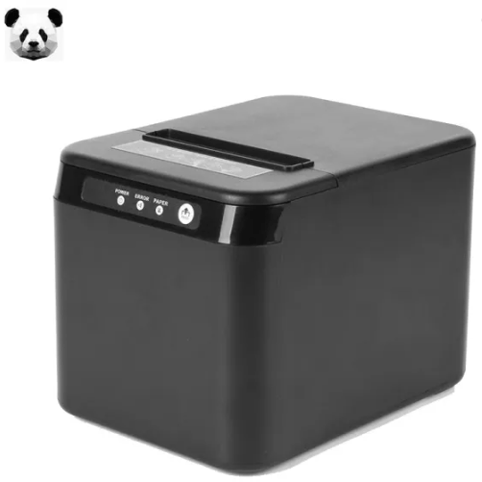
Compuone carries a wide range of receipt and label printers, with Panda as the standout brand for value and reliability. Two models worth highlighting from their receipt printer lineup:
- PANDA Receipt Printer 307 U+L – A compact, no-nonsense USB + LAN thermal printer. It’s a great fit for small to mid-sized shops that want a wired network connection without paying for extra features they don’t need.
- PANDA Receipt Printer 800 U+L – A step up in build and speed, also with USB + LAN connectivity, and a favorite among retail customers for handling higher daily transaction volumes without slowing down.
Both models cover the two connection types most POS setups actually use in Lebanon — USB for direct connection and LAN for networked tills — making them an easy, low-risk choice whether you’re setting up your first counter or replacing an aging printer.
Panda vs. Epson vs. Bixolon: How Does It Compare?
Epson and Bixolon are well-known names in receipt printing, and both make solid hardware. So how does Panda stack up?
- Price. This is where Panda has the clearest edge. Models like the PAN307 U+L and PAN800 U+L are priced well below comparable Epson TM-series or Bixolon SRP-series printers, while still covering the same core USB/LAN connectivity that most businesses need. For a shop buying multiple printers across several counters, that price gap adds up quickly.
- Quality and durability. Epson and Bixolon are often seen as the premium, industrial-grade choice — and for very high-volume enterprise environments, they can have an edge in long-term duty cycles. But for the everyday needs of retail shops, restaurants, and pharmacies, Panda’s build quality holds up well in daily use, and most owners don’t notice a meaningful gap in print speed or reliability.
- Availability and support. Because Epson and Bixolon are imported premium brands, spare parts and support in Lebanon can take longer to source. Panda printers, on the other hand, are widely stocked locally, so replacement parts, ribbons, and paper rolls are always close at hand.
- Overall value. For most small and mid-sized businesses, Panda offers the better balance: you get dependable everyday performance and easy local support at a noticeably lower cost than Epson or Bixolon. Larger enterprises with very high print volumes may still lean toward the premium brands, but for the vast majority of shops and restaurants in Lebanon, Panda is the more practical buy.
Label Printers: Not Just Receipts
Many businesses that need receipt printers also need to print barcode or shipping labels — for inventory, pricing tags, or logistics. Panda covers this too, with label printer models that pair naturally with the 307 U+L and 800 U+L on the same counter:
- PANDA Label Printer PAN310 – A compact barcode label printer, well suited for pricing tags and small product labels in retail.
- PANDA Label Printer PAN350 – A step up in resolution and print width, good for stores that print a higher volume of labels daily.
- PANDA Label Printer H500E – A wider-format label printer (108mm) with USB/Ethernet connectivity, built for shipping labels and heavier logistics use.
Running a PAN307 U+L or PAN800 U+L for receipts alongside one of these label printers
gives a shop everything it needs at checkout and in the stockroom, without mixing brands or drivers. If you also need barcode scanning hardware to go with your label printer, Compuone’s barcode reader lineup covers that too.
Why Panda Is One of the Best Printer Brands in Lebanon and Abroad
Panda has built a strong reputation both locally and internationally as a dependable, cost-effective choice for point-of-sale hardware. A few reasons it stands out:
- Built for everyday retail use. Panda printers are designed to handle the daily grind of retail and hospitality environments without breaking down.
- Flexible connectivity. Whether your setup needs USB or LAN, there’s a Panda model to match — no need to change your existing POS software or network.
- Consistent print quality. Sharp, legible text and barcodes, which matters for receipts, invoices, and inventory labels alike.
- Wide availability of accessories. Stands, adapters, and paper rolls are easy to find, keeping your printer running without long downtime.

How to Install a Receipt Thermal Printer
Setting one up is simpler than most people expect. Here’s the general process:
- Unbox and connect power. Plug in the power adapter and connect the printer to your computer or POS terminal via USB, LAN, or Wi-Fi, depending on your model.
- Load the thermal paper roll. Open the paper compartment, drop in the roll (make sure it’s facing the correct way — the heat-sensitive side down), and close the cover until it clicks.
- Install the driver. Most Panda printers come with a driver CD or a download link; install it on your POS computer so the system recognizes the printer.
- Connect to your POS software. Whether you’re using Retail Hub, a custom POS system, or accounting software, select the printer from the list of installed devices and set it as your default receipt printer.
- Run a test print. Print a sample receipt to confirm alignment, cutting, and print quality are all working correctly.
- For wireless models, connect the printer to your Wi-Fi network through its configuration menu or companion app before pairing it with your POS system
If any of these steps feel technical, Compuone’s technical team can walk you through setup remotely or on-site.
Who Needs a Receipt Printer?
Thermal receipt printers aren’t just for supermarkets. They’re used by:
- Retail shops and boutiques – for quick, professional checkout receipts.
- Restaurants and cafés – for order slips and customer bills.
- Pharmacies – for fast, accurate transaction records.
- Warehouses and logistics teams – using label printers for barcode tracking and shipping.
- Any small business owner switching from handwritten receipts to a more professional, POS-integrated system like a full POS system.
Warranty, After-Sales Support, and Why Compuone Is the Right Choice
A printer is only as good as the support behind it. This is where Compuone stands out as one of the leading suppliers of POS equipment in Lebanon. Every receipt printer sold comes with manufacturer warranty coverage, and Compuone’s team handles:
- Warranty claims and repairs, so you’re not left guessing if something goes wrong.
- Driver and software support, including access to a dedicated drivers page and manuals.
- Technical troubleshooting, whether it’s a paper jam, connectivity issue, or POS integration question.
- Spare parts and accessories, like power adapters and printer stands, so you’re never stuck waiting weeks for a replacement part.
- Direct customer support via phone and WhatsApp, meaning real help from a real person when you need it.
For businesses in Lebanon, having a local, responsive support team matters — you don’t want to be stuck dealing with an overseas supplier when your printer goes down in the middle of a busy shift. Compuone’s combination of quality Panda hardware, competitive pricing, and dependable after-sales support is what makes it a trusted name for POS equipment across the country.
Final Thoughts
Choosing the right receipt printer comes down to your business type and connectivity needs — USB, LAN, Wi-Fi, or mobile. Panda’s lineup covers all of these options with reliable, well-reviewed models, and Compuone backs every purchase with proper warranty and support. Browse the full range of receipt printers at Compuone to find the right fit for your business.