Home
Shop
Worker at POS counter

Everything You Need to Buy for Your Office in Lebanon – One Complete Guide

Opening or updating an office in Lebanon means dealing with realities most global buying guides don’t account for — dust, power cuts, and hardware that needs to survive daily heavy use, not just look good in a showroom. This guide covers the core equipment categories that actually matter, with links to detailed, verified buying guides for each.

Point of Sale: The Transactional Hub

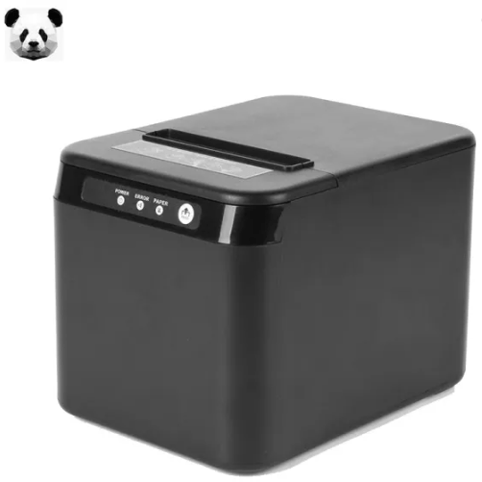
Relying on handwritten receipts or a standalone card terminal creates real reporting blind spots — it becomes hard to reconcile accurate end-of-day sales figures. A proper POS system combines barcode scanning, a touchscreen terminal, and receipt printing into one connected setup, tracking stock and sales together rather than separately. For the actual printer hardware behind this, see our receipt printer buying guide, which covers real PANDA models with verified specs.

Printing: Matching the Printer to Your Actual Volume

A basic home-use printer struggles under genuine office volume — frequent ink shortages and slow queues are common complaints once a small office scales up. Laser printers generally offer a lower cost-per-page than inkjet for high-volume, mostly-text printing like invoices and contracts, while inkjet still makes sense for color-heavy design work. See our guide on genuine vs compatible ink cartridges for keeping ongoing printing costs under control regardless of which printer type you choose.

Professional using printer at work

Networking: Solving Lebanon’s Concrete-Wall Problem

Reinforced concrete construction, common in Lebanese offices, blocks WiFi signal significantly more than typical drywall — a single router often can’t cover a multi-room space reliably. A mesh WiFi system solves this using multiple nodes working together; see our verified router and mesh buying guide for real CUDY and TP-LINK specs.

Power Protection: Non-Negotiable for This Market

Connecting your POS terminals, network gear, and computers to a properly sized UPS protects against both data loss and hardware damage during power cuts — this matters more here than in most markets given how frequently the grid switches. See our UPS sizing guide for calculating exactly what capacity your specific setup needs, rather than guessing.

Staff Tracking

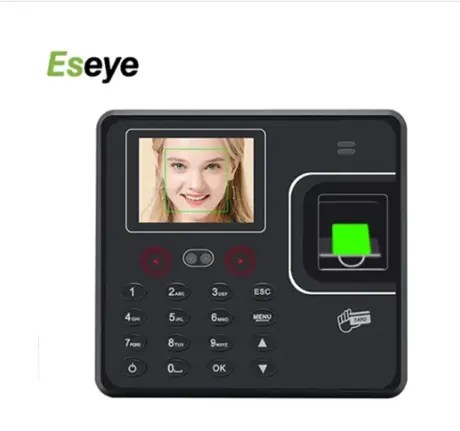
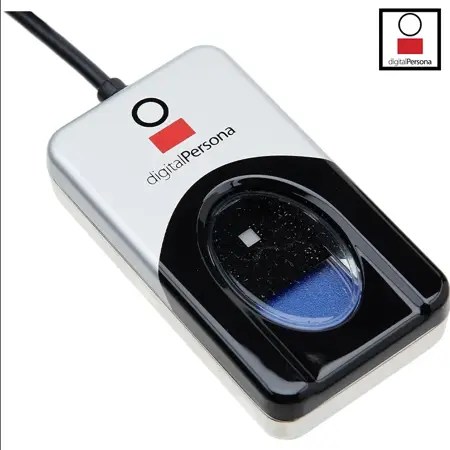
If you’re managing multiple staff, a dedicated time attendance system replaces manual sign-in sheets with tamper-proof digital records. See our time attendance comparison guide for verified ESEYE, ZK, and Digital Persona options.

Putting It Together

  • Retail or wholesale business: POS system + receipt printer + UPS are the non-negotiable core.
  • Administrative or professional office: Reliable printer + solid networking + UPS for the computers.
  • Any office with multiple staff: Add time attendance to remove manual scheduling errors.

Frequently Asked Questions

What happens to a POS sale if power cuts mid-transaction?
This depends on the specific POS software and hardware — many systems save transaction data locally as it happens. A properly sized UPS is the reliable way to keep the terminal powered long enough to complete the sale and shut down safely, rather than relying solely on the software’s own recovery behavior.

Monochrome or color laser printer for a standard office?
If your work is mostly text — invoices, contracts, shipping documents — monochrome is faster and cheaper per page. Color makes sense if you regularly print visual presentations or marketing materials in-house.

Can one cash drawer connect to multiple POS terminals?
Standard cash drawers are built to connect to a single receipt printer or terminal. For multiple checkout lanes, each terminal typically needs its own drawer to keep cash handling accountable per till.

How does biometric time attendance protect employee privacy?
These systems generally don’t store actual fingerprint images — they convert the scan into an encrypted mathematical template, which is standard practice across this category of device.

Buying Support Through CompuOne

Building out office equipment piece by piece is normal — you don’t need to buy everything at once. CompuOne’s team can help you prioritize based on what’s actually creating friction in your current setup.

Woman showing laptop screen

Best Laptops to Buy in Lebanon 2026: Lenovo ThinkPad vs IdeaPad vs HP Elite Notebook – Full Comparison

Choosing a laptop based purely on the processing chip number listed on the box is a common shortcut, but it often leads to frustration later on. A fast chip inside a flimsy chassis can overheat when room temperatures climb, and battery life or keyboard durability matter just as much day to day as raw speed. This comparison breaks down three real options in CompuOne’s range — Lenovo ThinkPad, HP EliteBook, and Lenovo IdeaPad — and which actually fits different needs.

Quick Comparison

Line Example Best For
Lenovo ThinkPad ThinkPad range Durability, repairability, business use
HP EliteBook EliteBook 840 G11 Corporate security, premium build, executives
Lenovo IdeaPad IdeaPad range Students, budget-conscious everyday use

Lenovo ThinkPad: Built for Durability

ThinkPads have a long-standing reputation for physical durability and repairability — developers and IT professionals often favor them specifically because individual components are easier to service or replace over the machine’s lifespan, rather than needing a full replacement when one part fails. Browse Lenovo ThinkPad models at CompuOne.

HP EliteBook: Corporate Security and Premium Build

Corporate executives and professionals handling sensitive documents often need a machine that combines strong security with a premium feel. The HP EliteBook 840 G11 pairs a premium aluminum build with enterprise security features built into the hardware itself. Many EliteBook models include an integrated privacy screen toggle, useful for reviewing confidential documents in shared workspaces or coffee shops without a physical privacy filter attachment.

Lenovo IdeaPad: Budget-Conscious Everyday Use

Students and freelancers often need a reliable laptop for daily multitasking without an enterprise-level price tag. Lenovo IdeaPad models balance solid everyday performance with a lighter, more portable build — practical for carrying between classes or a coworking space.

Female student with laptop

Managing Heat and Dust

Warm climates and dust can genuinely affect laptop cooling over time. Dust accumulating in the internal cooling fins traps heat and forces fans to run harder, which can cause thermal throttling — the processor slowing itself down to avoid overheating. Blowing out the exhaust vents with compressed air every few months, and keeping the laptop raised slightly off flat, dusty surfaces so intake vents draw clean air, are simple habits that prevent this over time.

Upfront Cost vs Long-Term Value

Consumer-focused laptops often carry a lower upfront price, but lighter hinges and non-upgradable components can mean earlier replacement under heavy daily use. Business-grade machines like ThinkPad or EliteBook models typically cost more upfront but hold up longer and are often easier to service individual components on, which can make them more cost-effective over a multi-year lifespan for daily business use.

Which Laptop Fits Your Situation?

  • IT professionals, developers, anyone prioritizing repairability: Lenovo ThinkPad.
  • Corporate executives, security-sensitive work: HP EliteBook.
  • Students, freelancers, budget-conscious everyday use: Lenovo IdeaPad.

Frequently Asked Questions

Can I upgrade the RAM or storage on a budget consumer laptop later?
Many thin consumer laptops use memory soldered directly to the motherboard, which can’t be upgraded later. If you expect your workload to grow, it’s worth choosing a higher configuration upfront or confirming upgradability with CompuOne before buying.

Do business laptops handle power surges better than consumer models?
Build quality varies by specific model rather than a blanket rule across all business laptops. Connecting your charger to a surge protector or UPS is a reliable way to protect any laptop, business-grade or not, from sudden power fluctuations.

Are ThinkPad keyboards really more durable than consumer laptop keyboards?
ThinkPads have a strong general reputation for keyboard durability and spill resistance, built up over years of enterprise use, though exact specifications vary by specific model and generation — worth confirming details for the specific model you’re considering.

Why does laptop battery life drop when using a mobile hotspot?
Maintaining a wireless connection to a cellular tower draws more power than connecting to a nearby WiFi router, since the radio has to work harder over greater distance. Lowering screen brightness and closing background apps helps conserve battery when working this way.

Buying Support Through CompuOne

Browse the full laptops Lebanon range at CompuOne. If you’re not sure which line fits your actual workload and budget, the team can walk you through the tradeoffs rather than upselling features you won’t use.

WiFi router on office

Smart Office Setup in Lebanon: WiFi, Time Attendance & Money Counters

Running a business in Lebanon means dealing with operational challenges that offices elsewhere rarely face — power cuts, cash-heavy transactions, and buildings with thick concrete walls that block WiFi signals. This guide covers three pieces of hardware that solve real, everyday friction: a network that stays up, staff tracking that doesn’t rely on paper, and cash counting that doesn’t eat into your day.

Network: Solving Lebanon’s Concrete-Wall Problem

Dense concrete construction, common across Lebanese offices, blocks WiFi signals far more than typical drywall. A single router often can’t cover a multi-room office reliably. A mesh WiFi system solves this by using multiple nodes that work together to blanket the space — see our full router and mesh buying guide for verified specs on CUDY’s WiFi 6 and mesh options. Running your networking gear through a properly sized UPS keeps your connection up through short power cuts rather than dropping every time the state grid switches.

Staff Tracking: Moving Off Paper Logs

Paper attendance logs or spreadsheets invite errors and buddy-punching — signing in for a late colleague. A dedicated time attendance machine using fingerprint or face recognition converts physical check-ins into clean, tamper-proof digital records that feed straight into payroll. For a full comparison of ESEYE, ZK, and Digital Persona options with verified specs, see our time attendance buying guide.

Cash Handling: Counting Without the Manual Hours

Lebanon’s cash-heavy transaction culture means even small shops handle real volumes of banknotes daily. Counting by hand costs time and invites both calculation errors and counterfeit risk. CompuOne carries several PANDA and BELLCON money counters built for exactly this:

Model Type
PANDA 920 Currency counter
PANDA 922 Multi-currency counter
PANDA N60 Money counter
BELLCON V2510 Money counter
PANDA 137B Counterfeit detector

The PANDA 922’s multi-currency capability is particularly useful in Lebanon specifically, given how routinely businesses handle both USD and LBP in the same till. If you only need counterfeit checking rather than full counting, the PANDA 137B detector is a lighter-weight, cheaper option.

Cash counting machine

Maintenance for Lebanon’s Climate

Coastal humidity and seasonal dust are real factors for electronics here. A few habits genuinely extend hardware life:

  • Position wireless nodes up on walls or ceilings, clear of furniture, for better coverage.
  • Wipe biometric scanners weekly with a microfiber cloth to keep the sensor clean.
  • Run a cleaning card through money counters periodically to prevent dust from affecting the optical sensors.
  • Keep networking gear off the floor and in a ventilated spot to reduce dust buildup and heat.

Frequently Asked Questions

What happens to my time attendance or money counter during a power cut?
This varies by specific model — some include internal backup batteries, others don’t. Connecting critical devices to a properly sized UPS is the reliable way to keep them running through short outages regardless of the device’s own battery situation.

Can a money counter handle both USD and LBP?
The PANDA 922 is built specifically for multi-currency counting, making it the right choice if your till regularly handles both currencies rather than just one.

Do thick concrete walls really affect WiFi that much?
Yes — concrete absorbs wireless signal significantly more than drywall construction common elsewhere. A mesh system or wired backhaul between nodes is usually necessary for reliable coverage across a concrete-walled office.

Is employee biometric data stored securely?
Time attendance hardware generally doesn’t store actual fingerprint images — it converts the physical scan into an encrypted mathematical template, which is a standard security approach across this category of device.

Buying Support Through CompuOne

If you’re not sure which combination of networking, attendance, and cash-handling equipment fits your office, CompuOne’s team can walk you through it based on your actual space and transaction volume rather than guessing.

Hands typing laptop

Home Office Setup Guide: Laptop, Windows 11, Printer, Networking, and Power Protection

A reliable home office needs more than a laptop and a spot by the window — it needs hardware and software that work together without crashing halfway through a task, especially given Lebanon’s power situation. This guide walks through each piece separately: laptop, operating system, printer, networking, power protection, backup storage, and POS equipment if you run a business from home.

Laptop or Desktop: The Foundation

Your choice here depends on how you actually work. A laptop offers flexibility — useful if you move between rooms, work from a café occasionally, or share your space with family. A desktop generally offers more performance per dollar and easier long-term upgrades if you’re staying at one desk permanently. Either way, prioritize at least 8GB RAM for comfortable multitasking, and an SSD rather than a mechanical hard drive — see our SSD guide for why this matters more than almost any other single upgrade. Browse CompuOne’s laptop range to compare current models.

Windows 11 Pro: Why This Matters Now

Windows 10 reached end of support from Microsoft on October 14, 2025. Without enrolling in Microsoft’s paid Extended Security Updates program, a Windows 10 machine no longer receives security patches — a real risk for anyone handling client files or business data. Microsoft Windows 11 Pro is the current, actively supported choice, and includes BitLocker and other built-in encryption tools — if your device is lost or accessed without permission, your files stay locked and unreadable without the encryption key. It also supports connecting to corporate domains, useful if you need to reach an office server remotely. If you’re currently on Windows 10 with hardware that meets Windows 11’s requirements, upgrading is worth prioritizing.

Printer: Wireless and Matched to Your Workflow

A wireless printer changes your daily workflow — send a document to print from your phone, and it’s ready by the time you reach your desk, with Wi-Fi Direct keeping it working even if your router briefly reboots. If you design colorful presentations, an inkjet handles that well. If your daily work is mostly text — invoices, contracts, shipping notes — a monochrome laser printer is more practical: faster, sharper text, and toner that lasts far longer than ink without drying out. See our guide on genuine vs compatible ink cartridges for keeping running costs down.

Retail cashier at checkout counter

Wi-Fi and Networking: Don’t Rely on the ISP’s Basic Router

The router your ISP provides is often the weakest link in a home office setup. A dedicated router like the CUDY AX3000 — dual-band WiFi 6, rated up to 3000Mbps combined, verified against CUDY’s official specifications — handles multiple connected devices with far less congestion than a basic ISP router, especially relevant if video calls compete with other household devices on the same connection. If your apartment has dead zones or multiple floors, see our router buying guide for mesh system options.

UPS and Power Protection

A proper workspace guide can’t ignore Lebanon’s electrical situation. Sudden voltage spikes can damage computer parts and erase unsaved files in a second. Connecting your computer and router to a reliable UPS is genuinely worth doing. Runtime during an outage depends entirely on the specific UPS model, its battery capacity, and how much load you’re actually connecting — there’s no single fixed number that applies across different setups. See our UPS sizing guide for how to calculate this properly for your own equipment.

External Backup Storage

A storage drive on your desk is not automatically a backup — it’s only a backup if a separate copy of your important files exists somewhere else too. An external drive like the Seagate Expansion gives you an affordable second copy of client files, project work, or business records. See our external storage guide for choosing between HDD and SSD options based on your budget and how often you need to access the backup.

POS Equipment for Home-Based Businesses

If you sell physical goods or run a small distribution business from home, a standard computer setup isn’t quite enough. A POS system changes how you track stock and process sales.

Component What It Does
Desktop terminal with touch screen Quick order entry at checkout
Thermal receipt printer No ink refills — heat-based printing
Handheld barcode scanner Log new inventory in seconds
Cash drawer Connects directly to the printer base

See our receipt printer guide for model-specific detail.

What Do You Actually Need?

  • Home office (general remote work): A capable laptop or desktop, Windows 11 Pro, a wireless printer, and a UPS sized to your equipment. Networking upgrades matter most if video calls or file transfers feel unreliable.
  • Student: Prioritize a reliable laptop and Windows 11 Pro; a printer and UPS are useful but often lower priority than for a working professional.
  • Freelancer or professional handling client data: Windows 11 Pro for BitLocker encryption, a UPS to prevent data loss during outages, and external backup storage for client files — these three matter more here than for casual home use.
  • Home-based business: Everything above, plus POS equipment matched to your sales volume, and a router that can handle multiple connected devices without slowing down during busy periods.

Frequently Asked Questions

Can I upgrade my current laptop to Windows 11 Pro without losing my files?
Generally yes, provided your hardware meets Windows 11’s system requirements — the upgrade preserves personal files, documents, and installed programs. Back up critical data to an external drive before any major system upgrade regardless.

How long will a UPS keep my equipment running during an outage?
This depends on the specific UPS model, its battery capacity, and how much you’re connecting to it — not a fixed number that applies to every setup. See our sizing guide for how to calculate this for your own equipment.

Do I need a business-grade router for a home office?
Not necessarily a business-grade unit specifically, but a dedicated router with WiFi 6 handles multiple devices and video calls more reliably than a basic ISP-provided router, especially in a household with several people online at once.

Is copying files to an external drive the same as having a backup?
Not by itself — if that drive is your only copy and it fails or is lost, you have no backup at all. A real backup means a separate copy exists somewhere else too.

Buying Support Through CompuOne

CompuOne offers office hardware, enterprise systems, and technical support to help you build a reliable home office setup piece by piece, based on what your specific work actually needs.

Back to Top
Chat on WhatsApp
Product has been added to your cart